Elevate Your Designs with a Summer Invitation Mockup
Visual presentation is often the deciding factor between a browser scrolling past and a customer clicking "add to cart." In the competitive world of digital design and stationery, having a realistic way to showcase your work is essential. A Summer Invitation Mockup serves as that critical bridge, transforming a flat digital file into a tangible, lifelike preview. This tool is not just about aesthetics; it is a practical asset that helps diverse creators communicate the value of their designs effectively.
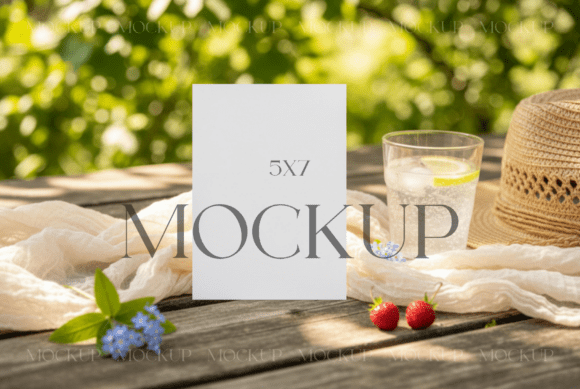
At its core, this resource is a neutral aesthetic template designed in PSD format. It features a realistic layout specifically calibrated for vertical 5x7 card designs. The package typically includes a high-resolution JPG (4000x3000px at 300DPI) for immediate use and the editable PSD file containing Smart Object layers. These Smart Objects are the engine of the mockup, allowing you to insert your own graphics seamlessly without needing advanced photo manipulation skills.
Why Presentation Matters Across Different Roles
The importance of a high-quality mockup varies significantly depending on who is using it. While the end result—a beautiful image of an invitation—is the same, the motivations and priorities differ among professionals, hobbyists, and business owners.
For small business owners and entrepreneurs running online shops, the mockup is a sales tool. Their primary concern is conversion. They need to know that the mockup loads quickly, looks professional on mobile devices, and accurately represents the product to reduce return rates or customer confusion. For them, the commercial value of the file is paramount. They are evaluating whether this asset will help them attract more buyers and justify a higher price point for their custom invitations.
In contrast, freelance designers and creators often view the mockup through the lens of portfolio development. They need flexibility. Can they apply filters to match their branding? Does the lighting look natural? Their priority is creativity and brand alignment. They might use the same summer-themed template to showcase a wedding invite, a birthday party announcement, or a corporate summer event flyer. The ability to modify the image to fit a specific client's vibe is crucial for their workflow.
Tailored Use Cases for Various Skill Levels
One of the most significant advantages of a well-structured PSD mockup is its accessibility. It caters to a wide spectrum of technical proficiency, from absolute beginners to seasoned graphic artists.
For Beginners and Hobbyists
If you are new to Photoshop or simply enjoy designing invitations as a hobby, the learning curve can feel steep. However, this specific type of mockup simplifies the process. You do not need to understand complex lighting engines or shadow casting. The workflow is straightforward:
- Launch Photoshop and open the PSD file.
- Locate the Smart Object layer (usually indicated by a small icon on the layer thumbnail).
- Double-click the icon to open the embedded file.
- Drag and drop your 5x7 design into this window.
- Save the Smart Object file, and watch your design automatically appear in the main scene with realistic shadows and perspective.
This ease of use allows hobbyists to create professional-looking listings for Etsy or social media without investing hours in tutorials. The focus remains on the design itself rather than the technicalities of rendering.
For Professionals and Marketers
Experienced users appreciate the efficiency and resolution quality. A 300DPI file ensures that the output is crisp enough for high-end portfolio presentations or even print proofs. Professionals often need to batch-process images or apply specific color grading to match a seasonal campaign. The neutral aesthetic of this summer template provides a clean canvas that doesn't compete with intricate invitation patterns. It allows marketers to test different visual strategies—such as warm versus cool tones—to see what resonates best with their target audience before finalizing a campaign.
For Educators and Publishers
Educators teaching graphic design or digital marketing can use these files as practical examples in their curriculum. They demonstrate how Smart Objects function and why context matters in design. Similarly, publishers looking to release templates or design bundles can include these mockups as bonus assets, adding long-term usefulness and perceived value to their products. For these groups, the reliability of the file structure and the clarity of the included instructions are key evaluation metrics.
Evaluating Quality and Flexibility
When deciding if a Summer Invitation Mockup fits your needs, consider your specific project goals. Are you looking for speed, or do you need deep customization?
Speed and Efficiency: If you have a deadline approaching for a summer event or a product launch, the drag-and-drop functionality of Smart Objects is invaluable. It reduces the time spent on presentation from hours to minutes. This is particularly relevant for freelancers managing multiple clients simultaneously.
Flexibility and Branding: The terms of use for such files usually allow for modification. You can apply filters, adjust brightness, or crop the image to fit Instagram stories or Pinterest pins. This adaptability ensures that the mockup serves your brand identity rather than forcing your brand to fit the mockup. However, it is important to note that while you can modify the presentation, reselling the mockup file itself as a template is generally not permitted. The value lies in using it to sell your designs, not the tool itself.
Realism and Aesthetic: The "neutral aesthetic" mentioned in the file description is a deliberate choice. Summer designs often feature vibrant colors, florals, or bold typography. A busy background in a mockup can clash with these elements. A neutral setting ensures that the viewer's eye is drawn immediately to the invitation details—the date, the venue, and the style.
Making the Right Choice for Your Workflow
Ultimately, determining whether this tool matches your needs comes down to your current bottlenecks. If you are struggling to get customers to visualize your digital files, or if your portfolio images look flat and unengaging, integrating a high-quality mockup is a logical next step.
Consumers browsing online shops respond to realism. They want to imagine holding the invitation in their hands. By presenting your seasonal designs beautifully with a realistic preview, you bridge the gap between digital expectation and physical reality. Whether you are a blogger sharing DIY party ideas, a stationery shop owner updating listings, or a designer refining your craft, the right mockup enhances the perceived quality of your work.
Remember that this is a digital asset; no physical item will be shipped. The value is entirely in the file's utility. Once downloaded, it becomes a permanent part of your creative toolkit, ready to be used for personal projects or commercial client work. By understanding how different audiences leverage these tools—from the beginner seeking simplicity to the pro demanding high-resolution fidelity—you can better assess how a Summer Invitation Mockup can elevate your own projects and help you achieve your specific creative and business goals.